It tracks on its own
WFH Diary sits in your menu bar and records when your Mac is in use. Short pauses count as work. There is nothing to start or stop.
Mac menu bar app for Australians who work from home
WFH Diary records your hours automatically from your Mac’s menu bar, asks about the gaps, and builds the diary the ATO’s 70c fixed rate method asks for. It never looks at what you do.
Free to track. Pro adds tax-time reports from A$14.99 a year. macOS 14 Sonoma or later.
ATO-ready means your report has what the fixed rate method needs: the actual hours you worked from home, recorded at the time, with the rate for each period. It isn’t an ATO approval. The ATO doesn’t approve apps.
Records when, never what
Start, end and pauses. No app names, window titles or screenshots.
Kept at the time
A day-by-day record built for the fixed rate method (PCG 2023/1).
Your iCloud only
Syncs between your Macs. Nothing ever reaches us.
How it works
Most hours need nothing from you. WFH Diary asks only about the moments a record can’t settle on its own.
WFH Diary sits in your menu bar and records when your Mac is in use. Short pauses count as work. There is nothing to start or stop.
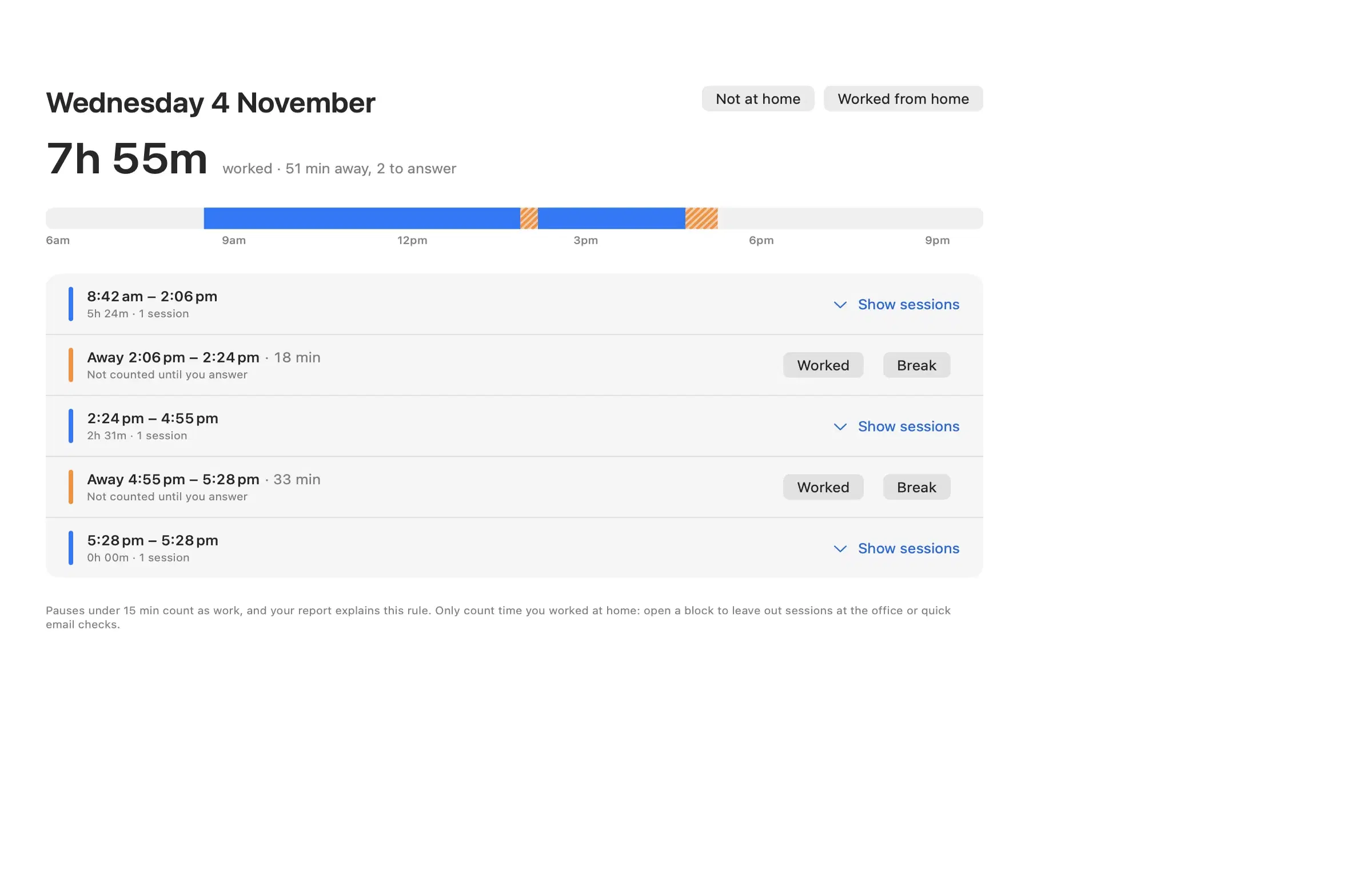
Review shows only what needs you: a longer pause, a day to confirm, a weekday with nothing tracked. Most weeks it takes a minute.
Pick a tax year and export a PDF diary and CSV, with the 70c fixed-rate amount worked out. Cents are dropped, the way the ATO does it.
The diary
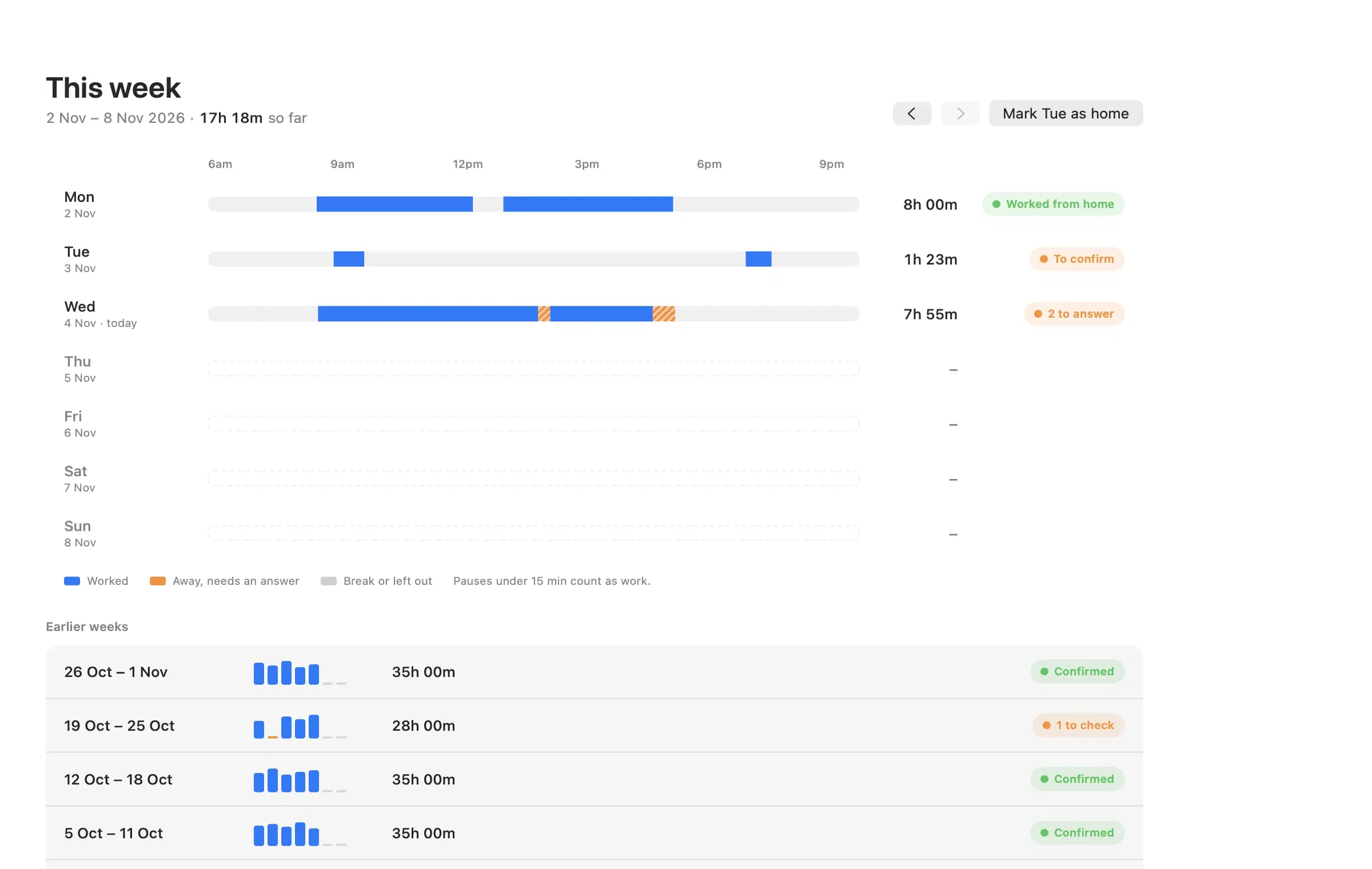
Four views. Each opens on what matters now, not on a wall of sessions.
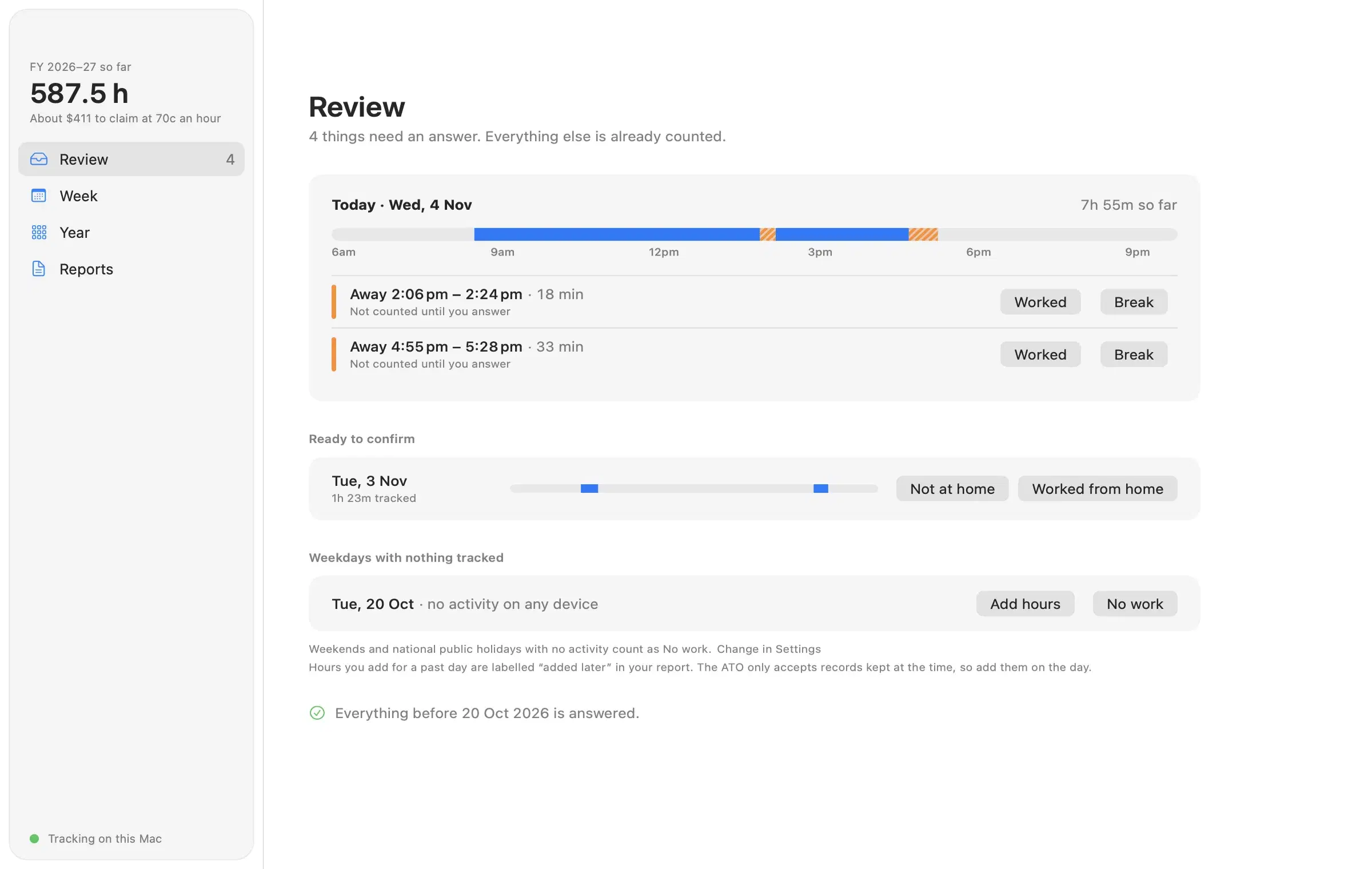
Review lists only what needs an answer. Everything else is already counted.
Lives in your menu bar
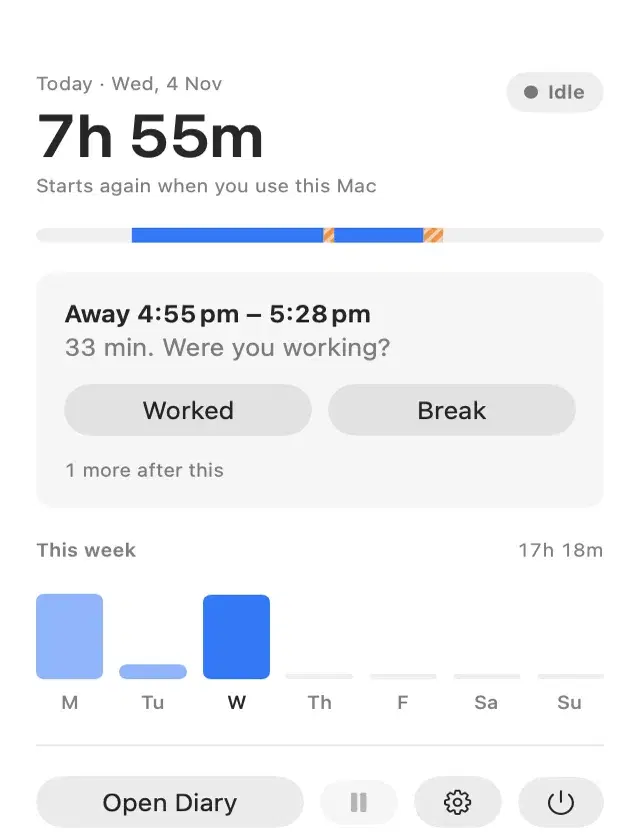
WFH Diary sits next to the clock and records when your Mac is in use. One click shows where your day is up to.
Built for tax time
Everything that is already clear is counted. You only see the few things that need an answer, oldest first.
Under 15 minutes counts as work. For a longer pause, WFH Diary asks if you were working, at the time, and keeps your answer.
Use two Macs and the hours merge through your own iCloud. Overlapping time is counted once.
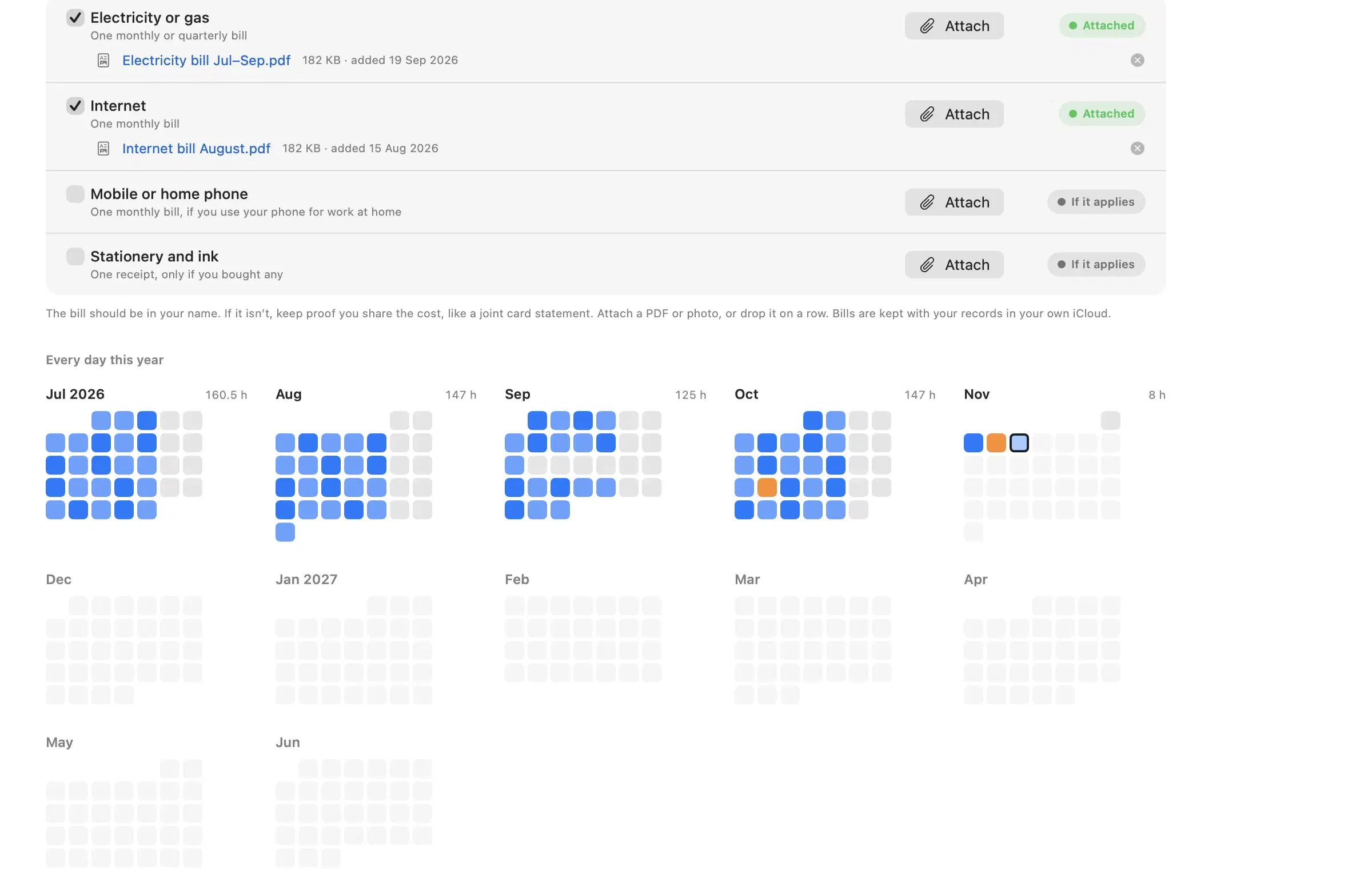
PDF and CSV for any tax year, with the rate for each period and the amount to claim. Attach your bills, and the report lists them.
The fixed rate needs a bill for each running cost it covers: energy, internet, phone and stationery. Tick each one off for the year, or attach it.
A nudge at a time you choose, on workdays only or every day. It can open at login, and you can pause it from the menu bar any time.
Print your logged sessions with boxes to tick and lines to write on, or only the days still to check.
If your employer pays all your running costs, you can’t use the fixed rate. Say so in Settings and your report warns you, plainly.
The ATO wants records for five years after you lodge. WFH Diary keeps everything until you choose to delete it.
Records kept at the time
The ATO doesn’t accept estimates or catch-up spreadsheets for the fixed rate method. WFH Diary records hours as you work, and is clear about where each hour came from.
Private by design
WFH Diary records when your Mac is in use and nothing else. Tracking needs no special permissions, and your records stay in your own iCloud.
Other ways to keep the diary
Any of them can work. What matters is a record of the actual hours, kept at the time. The difference is who does the remembering.
Free and official. You type in your hours on your phone, each day, yourself. A good choice if you’ll remember to.
Works if you fill it in as you go. A sheet filled in from your usual schedule in June is an estimate, and the ATO says estimates aren’t enough.
Records the hours on its own while you work, then asks only about the gaps. You still confirm each day was at home.
Pricing
Prices in Australian dollars, including GST. No account to create.
A$0 forever
A$14.99 a year
or A$39.99 once, for life
macOS 14 Sonoma or later. Pro is bought in the app through the Mac App Store, and Restore Purchases works on every Mac signed in to your Apple Account.
Questions
The fixed rate method needs a record of the actual hours you worked from home, kept at the time (PCG 2023/1). WFH Diary records your hours as they happen and keeps your answers about pauses and days. You still confirm that each day was work at home, and you are responsible for what you lodge. This is general information, not tax advice.
No app is. The ATO doesn’t approve or certify record-keeping apps, and its own free tool is myDeductions. What the ATO checks is your records. For the fixed rate method it wants the actual hours you worked from home, recorded at the time. WFH Diary records those automatically, and you confirm each day.
From 2026–27 you get the higher of a $1,000 standard deduction or your itemised work expenses. To itemise more than $1,000 you need records, including your actual WFH hours. With no other expenses, that takes about 1,429 hours at 70c. You won’t know until June which is higher, so the diary keeps the option open.
No. It knows when your Mac was in use, not where you were. Review asks you to confirm each day, and you can leave out any session that was at the office. Weekends and national public holidays with no activity are marked as no work for you.
Hours you didn’t record at the time are hard to claim under the fixed rate method, because estimates aren’t accepted. WFH Diary Pro can suggest past sessions from activity your Mac recorded, for you to check day by day. Treat them as a starting point, not a record, and check with a tax agent before claiming them.
Only through your own private iCloud, which only you can read. Nothing is sent to us. There are no third-party SDKs, analytics or crash reporting.
Sessions merge across all your Macs through iCloud. Overlapping time is counted once, so you never claim an hour twice.
Tracking, the diary, manual entries, the printable worksheet, bills, iCloud sync and your deduction estimate are free. WFH Diary Pro adds PDF and CSV reports for your return and Suggest past hours (suggestions from file activity that you check, marked added later), for A$14.99 a year or A$39.99 once.
Any Mac running macOS 14 Sonoma or later. WFH Diary is a menu bar app from the Mac App Store. There’s no iPhone or Windows version yet.
Rates are stored by period, so old hours keep the rate that applied then (67c before 1 July 2024, 70c from then). We update the app when the ATO announces a change.
Tracking needs nothing beyond the standard Mac sandbox, and notifications are optional. It never asks for screen recording, accessibility, the microphone, the camera, your location or your contacts.
Install it once. Every day you work from home until 30 June is recorded the way the fixed rate method asks.